


TRUEor magnetic north, your choice
20 sfigure of eight for its own calibration
1-5smoothness, up to 20 reads a second
0accounts, network or tracking
What the strip shows
The heading
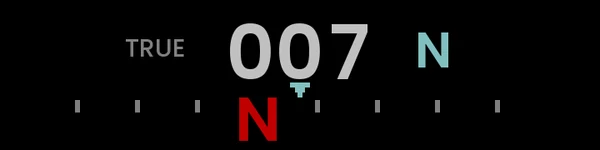
The way the watch is pointing, in three digits with its point of the compass beside them, over a tape of ticks and letters that slides as you turn. North is the N in red.
True or magnetic
TRUE beside the digits means headings corrected to true north by your declination; MAG means the compass's own north. With no declination set, north is magnetic.
Calibration
It uses the watch's own, showing UNCALIBRATED and CAL IN SETTINGS until there is one. Or set it to self: open the glances, go to Direction and turn the watch through a figure of eight for 20 seconds.
Lodestone's compass, in a glance
- The same heading and the same true north as Lodestone, in a strip you reach without opening an app.
- True north needs your declination; the curator looks it up from the name of a town near you.
- Self calibration keeps its result; if it says NOT ENOUGH, leave the glances and open them again.
- Smoothness 1 to 5: from one compass reading a second, which saves the most battery, to twenty, which glides.
- Diagnostics shows how often the strip is redrawn and the compass read, in place of TRUE or MAG.
Settings
- A glance has no buttons: everything is set in the phone app
- Calibration: watch or self
- North: true or magnetic, and a declination
- Smoothness 1 to 5, and Diagnostics
- Changes take effect within 20 seconds
The watch runs every glance while the glances are open, so Direction reads the compass from then on; a glance you do not use is worth removing.