

1high water to set it up
24hours of tide, now in the middle
2rim arcs: steps and active minutes
0accounts, network or tracking
One face, read at a glance
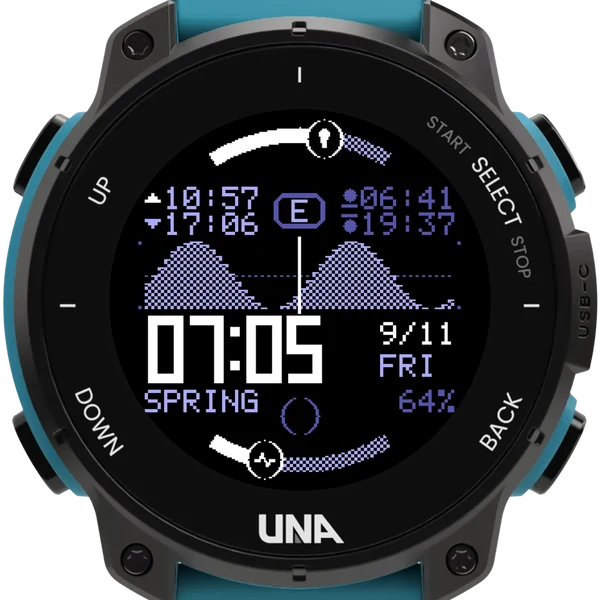
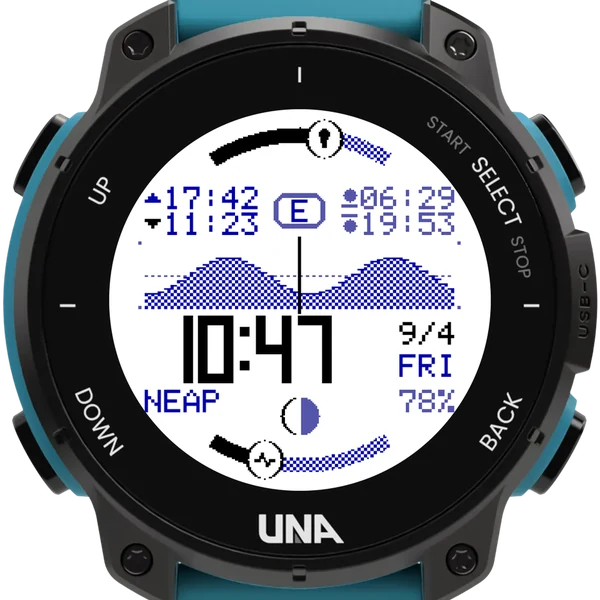
The tide graph
The tide itself, with the present moment down the middle: twelve hours behind you on the left, twelve ahead on the right. The next high and low water sit above it, the time and date large in the middle.
Sun, moon and your day
Sunrise and sunset sit beside the tide times; the moon's phase and how big today's tides are run along the bottom. Two arcs round the rim follow your steps and active minutes against the goals set on your watch.
Tide heights, if you want them
Copy two more numbers off the same table: how high a spring high water and a spring low water get. Turn on Show tide heights and the sun times become the heights of the two tides beside them.
Getting started
- Choose Tide Clock under Settings, Watch Face on the watch, then fill in one high water at your port in the phone app's Configure form.
- Any high tide from a tide table or surf forecast will do, last month's or next month's. Until then, the face shows the clock only.
- Where one reading is not enough, the Config Curator can fit your port's own tide from a NOAA station number or your port's position, unequal highs and all.
- The face picks up a settings change within a minute.
- Tide Clock is the watch-face version of Ebb. You can have both; they keep separate settings.
Settings
- Spring and neap difference: off, moderate or strong
- Tide heights, in m or ft, from two numbers off the same table
- Dark text on a light face, for daylight
- Screen light on wrist raise: night, always or off
- Show the emblem, or a plainer face
Times are good to about half an hour where the tide comes in twice a day, and out by hours where it comes once. Not for navigation.