

10objects, a DOWN tap apart
2dome views: compass or sky chart
1GPS fix, remembered
14days, then the age turns bright
The sky as a dome
The next pass
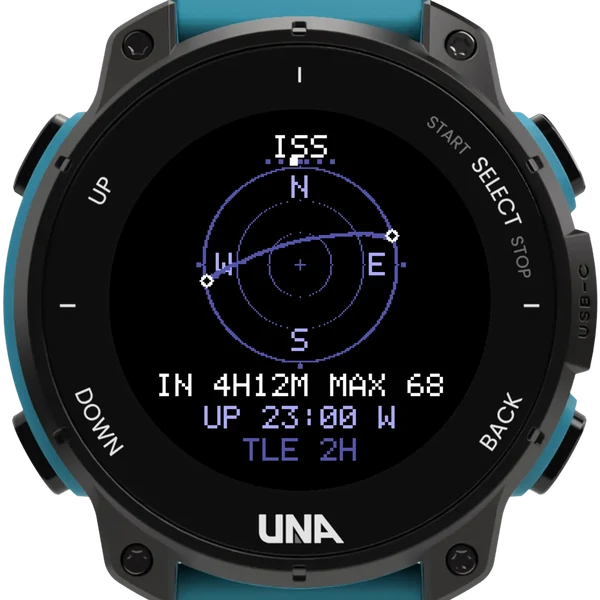
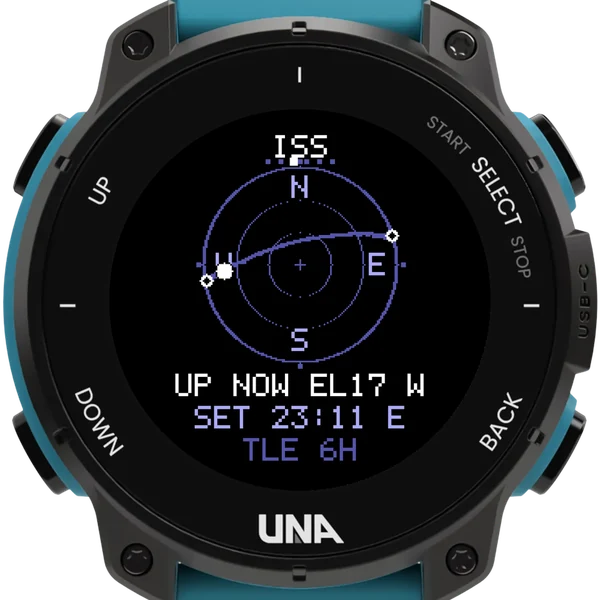
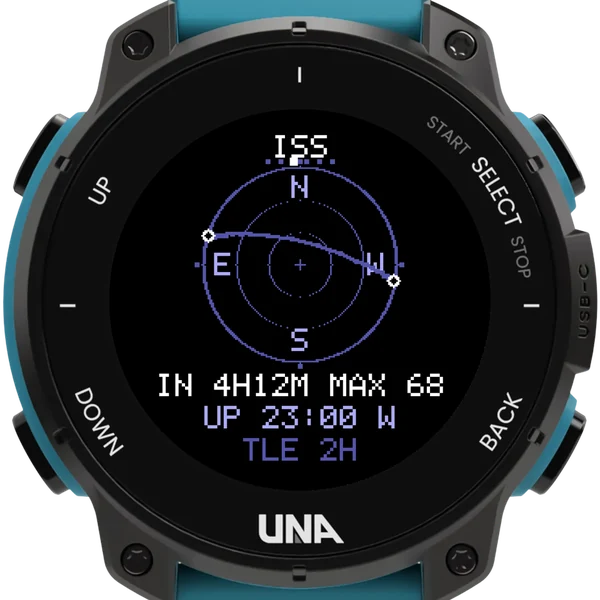
The sky as a dome and the next pass of a satellite across it: where it comes up, how high it climbs and where it goes down, with a countdown to the moment.
Passes you could see
By default only passes you could actually see are listed: the object sunlit against a dark sky. A half-second hold of SELECT lists every pass; a tap of UP moves to the next one.
Compass or sky chart
Hold SELECT two seconds to mirror the dome: a compass rose with east on the right, or a sky chart with east on the left, the way Heavens-Above draws it.
Orbits you choose
- Track the ISS, Tiangong and up to eight more objects, each from a two-line element set in the settings, with a name before a colon.
- The Config Curator starts you with the usual six, fetches their current orbits from Celestrak and shows exactly what to paste.
- The face shows how old the elements are, and turns the age bright past a fortnight.
- Passes are worked out in slices when the app opens: a start card, the scan's progress, then the first pass, with the rest filling in behind.
- Position comes from the watch's own GPS and is remembered, taken again after a week or when you reach another timezone.
Buttons
| DOWN | tap | the next object |
| UP | tap | the next pass |
| SELECT | hold | every pass or only visible ones; longer, mirror the dome |
| UP | hold | invert, the wrist light, the info page |
| BACK | exit |
Orbits go stale after a couple of weeks, so the curator is worth a bookmark to refresh them.